AppWidgetの作成(2) + PendingIntent

AppWidgetの作成(1)で作成したWidget(ウィジェット)は、ただ表示されるだけでしたが、今回はソースを修正してボタンを押したら表示されている文言が変わるというWidgetにしてみましょう。
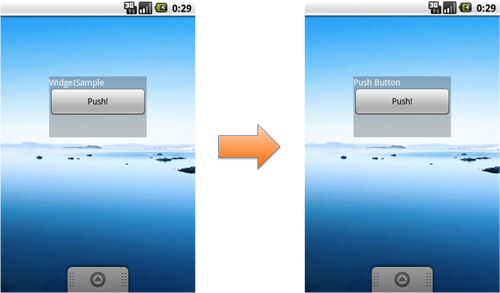
Widgetの場合は、Buttonのイベント(onClickListener、クリック処理)を受けるで説明している方法ではなく、PendingIntent(ペンディングインテント)の仕組みを利用します。
それでは説明&サンプルソースを。
今回のポイントは
- PendingIntent(ペンディングインテント)
- RemoteViews(リモートビュー)
の二つになります。
PendingIntent
ペンディングインテントとはIntentを即座に発行するのではなく、タイミングを指定して発行することができるIntentです。下記の2つのタイミングで発行することが可能です。
- 時間を指定して発行
- イベント発生時に発行
また、インテントを投げる先としては3つあり、それぞれ生成するメソッドは下記の通りです。
- Activity:getActivity(Context context, int requestCode, Intent intent, int flags)
- Service:getService(Context context, int requestCode, Intent intent, int flags)
- ブロードキャスト:getBroadcast(Context context, int requestCode, Intent intent, int flags)
今回は2番目のgetServiceを利用します。
RemoteViews
AppWidgetのレイアウトを取得するにはRemoteViewsクラスを利用します。
コンストラクタでパッケージ名とレイアウトIDを指定するだけです。
RemoteViews view = new RemoteViews(パッケージ名, レイアウトID)
ボタンを押すと表示されてる文言が変わるAppWidget
今回作るAppWidgetの大まかな流れです。
- onUpdateでインテントを発行してサービスを起動
- サービスでボタンクリック時に発行されるペンディングインテントを準備
- ボタンが押されるとサービスが呼び出され、文言を変更する
前回のソースを修正します。今回は必要なメソッド以外はオーバーライドしていません。 onUpdateで今回新たに作るサービス(ServiceSample)を起動します。
package org.jpn.techbooster.widget;

import android.appwidget.AppWidgetManager;
import android.appwidget.AppWidgetProvider;
import android.content.Context;
import android.content.Intent;

public class WidgetSample extends AppWidgetProvider {
	@Override
	public void onUpdate(Context context, AppWidgetManager appWidgetManager,
			int[] appWidgetIds) {
		super.onUpdate(context, appWidgetManager, appWidgetIds);

		// サービスの起動
		Intent intent = new Intent(context, ServiceSample.class);
		context.startService(intent);
	}
}
そのServiceSampleはこのようになっています。
onStartでまずはインテントを作成します。そしてそのインテントをPendingIntentクラスのgetServiceメソッドでサービスを起動するペンディングインテントとします。
次にRemoteViewsを用意して、setOnClickPendingIntentメソッドでボタンを押された時にインテントが発行されるようにします。
そして、ボタンが押された時のインテントであれば文字を変更する処理、ウィジェットの画面更新と続きます。
package org.jpn.techbooster.widget;

import android.app.PendingIntent;
import android.app.Service;
import android.appwidget.AppWidgetManager;
import android.content.ComponentName;
import android.content.Intent;
import android.os.IBinder;
import android.widget.RemoteViews;

public class ServiceSample extends Service {
	private final String BUTTON_CLICK_ACTION = "BUTTON_CLICK_ACTION";

	@Override
	public void onStart(Intent intent, int startId) {
		super.onStart(intent, startId);

		// ボタンが押された時に発行されるインテントを準備する
		Intent buttonIntent = new Intent();
		buttonIntent.setAction(BUTTON_CLICK_ACTION);
		PendingIntent pendingIntent = PendingIntent.getService(this, 0, buttonIntent, 0);
		RemoteViews remoteViews = new RemoteViews(getPackageName(), R.layout.main);
		remoteViews.setOnClickPendingIntent(R.id.button, pendingIntent);

		// ボタンが押された時に発行されたインテントの場合は文字を変更する
		if (BUTTON_CLICK_ACTION.equals(intent.getAction())) {
			remoteViews.setTextViewText(R.id.text, "Push Button");
		}

		// AppWidgetの画面更新
		ComponentName thisWidget = new ComponentName(this, WidgetSample.class);
        AppWidgetManager manager = AppWidgetManager.getInstance(this);
        manager.updateAppWidget(thisWidget, remoteViews);
   	}

	@Override
	public IBinder onBind(Intent intent) {
		return null;
	}
}
サービスを追加したのでマニフェストファイルも修正します。
intent-filterもお忘れなく。
<?xml version="1.0" encoding="utf-8"?>
<manifest xmlns:android="http://schemas.android.com/apk/res/android"
      package="org.jpn.techbooster.widget"
      android:versionCode="1"
      android:versionName="1.0">
    <application android:icon="@drawable/icon" android:label="@string/app_name">
		<receiver
    		android:name="WidgetSample"
    		android:label="WidgetSample">
    		<intent-filter>
    			<action android:name="android.appwidget.action.APPWIDGET_UPDATE" />
    		</intent-filter>
    		<meta-data
    			android:name="android.appwidget.provider"
    			android:resource="@xml/widgetsample"
    			/>
    	</receiver>

    	<service android:name="ServiceSample">
    		<intent-filter>
    			<action android:name="BUTTON_CLICK_ACTION" />
    		</intent-filter>
    	</service>

    </application>
    <uses-sdk android:minSdkVersion="4" />

</manifest>
About The Author
