シークバーを利用する方法

今日はシークバーについて紹介します。
シークバーはツマミをマウスで左右にドラッグしてパラメータを調整するGUIです。
オーディオのボリュームコントロールなど、量的なパラメータを設定する場合に重宝すると思います。
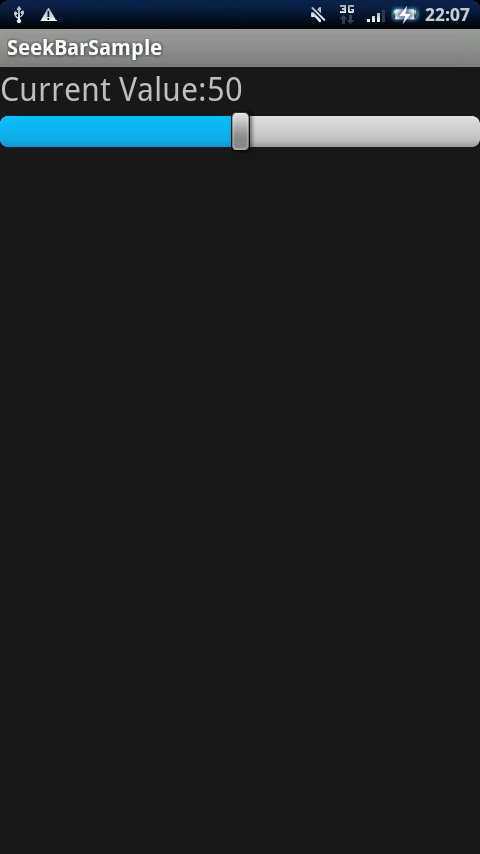
詳細は続きからどうぞ。
ではまず、レイアウトファイルを定義しましょう。
<?xml version="1.0" encoding="utf-8"?>
<LinearLayout xmlns:android="http://schemas.android.com/apk/res/android"
    android:orientation="vertical"
    android:layout_width="fill_parent"
    android:layout_height="fill_parent"
    >
<TextView
    android:id="@+id/TextView01"
    android:layout_width="fill_parent"
    android:layout_height="wrap_content"
    android:text="Value:"
    android:textSize="32px"
    />
<SeekBar
   android:id="@+id/SeekBar01"
   android:layout_width="fill_parent"
   android:layout_height="wrap_content"
   android:progress="50"
   android:max="100"
   />
</LinearLayout>
シークバーの設定値を表示するTextViewとSeekBar本体を定義しています。
SeekBarのプロパティにはandroid:progressで初期値を、android:maxで上限値を設定しています。
次にソースコード本体です。
package org.jpn.techbooster.SeekBarSample;

import android.app.Activity;
import android.os.Bundle;
import android.widget.SeekBar;
import android.widget.TextView;
import android.widget.SeekBar.OnSeekBarChangeListener;

public class SeekBarSample extends Activity {
    SeekBar seekBar;
    TextView tv1;

    /** Called when the activity is first created. */
    @Override
    public void onCreate(Bundle savedInstanceState) {
        super.onCreate(savedInstanceState);
        setContentView(R.layout.main);

        seekBar = (SeekBar)findViewById(R.id.SeekBar01);
        tv1 = (TextView)findViewById(R.id.TextView01);

        // シークバーの初期値をTextViewに表示
        tv1.setText("Current Value:"+seekBar.getProgress());

        seekBar.setOnSeekBarChangeListener(
        		new OnSeekBarChangeListener() {
					public void onProgressChanged(SeekBar seekBar,
							int progress, boolean fromUser) {
						// ツマミをドラッグしたときに呼ばれる
						tv1.setText("Current Value:"+progress);
					}

					public void onStartTrackingTouch(SeekBar seekBar) {
						// ツマミに触れたときに呼ばれる
					}

					public void onStopTrackingTouch(SeekBar seekBar) {
						// ツマミを離したときに呼ばれる
					}
        		}
        );
    }
}
SeekBarの各イベントはOnSeekBarChangeListenerと呼ばれるイベントリスナーが処理します。
上のソースコードではツマミをドラッグしたとき、ツマミに触れたとき、ツマミを離したときをトリガに
各種メソッドが呼び出されます。
今回の例ではツマミをドラッグしたとき=onProgressChanged()メソッドでTextViewに
現在のシークバーの設定値を表示する処理を実装しています。
About The Author

kseto
2 Comments